
Credits & Billing
Check your credit balance, see what each feature costs, buy a plan, top up credits, and review your transaction history.
HireMindPro uses two ways to pay for what you use: a subscription plan (Starter, Standard, or Pro) that unlocks the core features, and a pay-as-you-go credit balance for a couple of metered extras. Credits are worth $1 each and never expire — you get 5 free credits when you sign up. Most features (resume tailoring, cover letters, mock interviews, interview support, P2P sessions) are included free with any active paid plan; only auto-apply (0.1 credits per application) and voice cloning (10 credits per job) spend credits. This page covers how to see your balance, understand the costs, buy or change a plan, top up credits, and view your billing and credit history.
- Who it's for
- Anyone with a HireMindPro account who wants to understand how billing works, upgrade their plan, add credits to use auto-apply or voice cloning, or check what they have been charged. New users land here to claim and track their 5 free welcome credits.
- Cost
- Credits & Billing itself is free to view. You get 5 free welcome credits at signup. Spending: Auto-apply costs 0.1 credits per application; Voice cloning costs 10 credits per training job. Resume tailoring, cover letters, mock interviews, interview support, and P2P sessions consume NO credits (they are included free with any active paid subscription). 1 credit = $1 USD and credits never expire.
- Before you start
- A HireMindPro account (you must be signed in)
- For paid plans and top-ups: a payment method — either a card (Stripe) or crypto via NOWPayments, depending on the flow
- Nothing else: you automatically receive 5 free welcome credits when your account is created
Understand how credits and plans work
- There are two separate things on your account: your subscription tier (BASIC by default, or a paid plan like Starter/Standard/Pro) and your credit balance.
- Your subscription plan unlocks the core product — unlimited interviews, interview prep, resume tailoring, pretraining the AI model, and more — for the length of your membership.
- Credits are a separate prepaid balance worth $1 each that never expire. They are only spent on two features: auto-apply (0.1 credits per job application) and voice cloning (10 credits per training job).
- When you sign up you automatically get 5 free welcome credits so you can try auto-apply or start a voice clone before paying anything.
- Resume tailoring, cover letters, mock interviews, interview support, and peer-to-peer (P2P) sessions never cost credits — they are gated by your paid subscription tier instead.
View your credit balance and what each feature costs
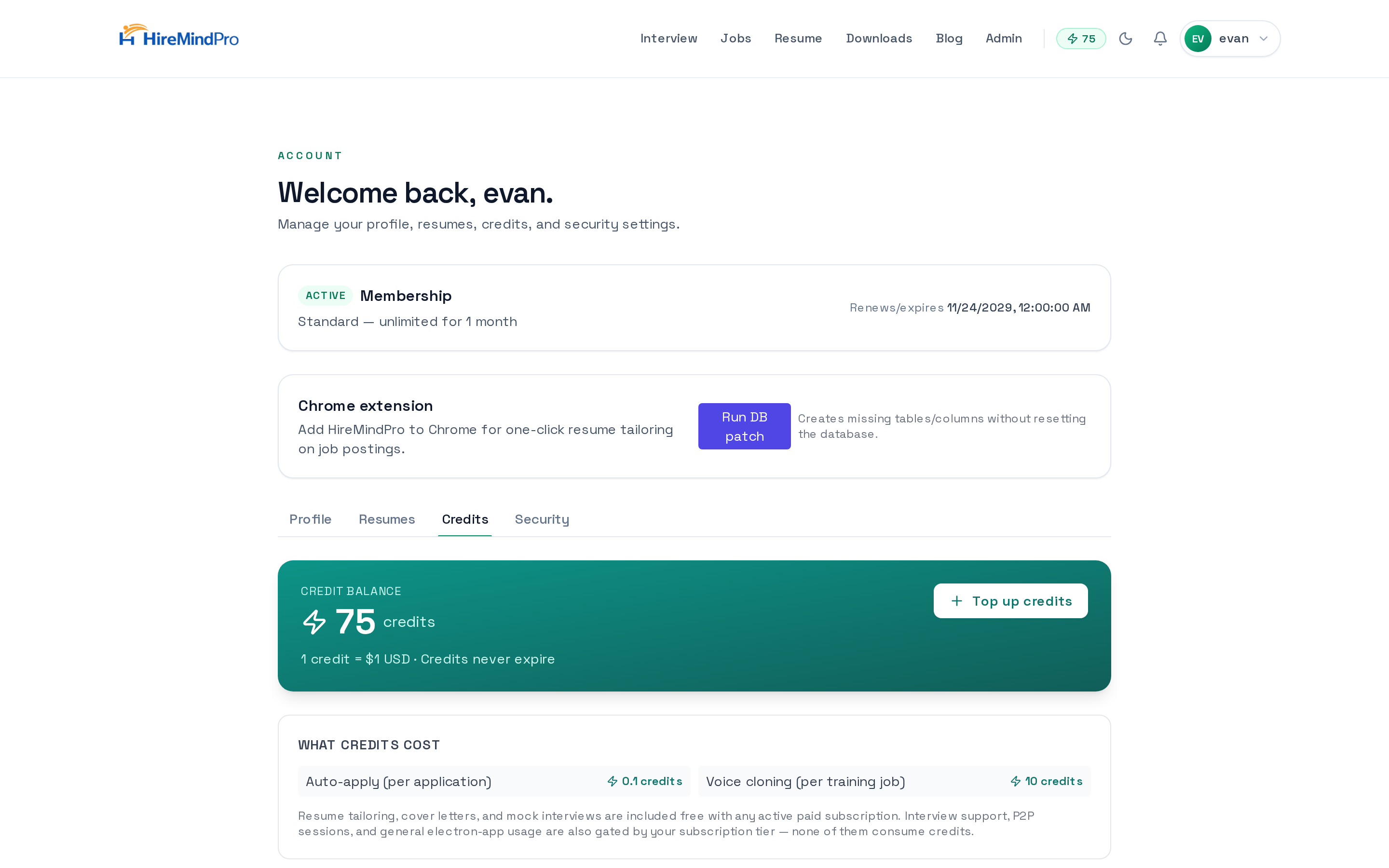
- Sign in, then go to your account at /myaccount.
- Open the Credits tab (you can also go straight to /myaccount?tab=credits).
- At the top you'll see your Credit balance card showing your current credits, with the note '1 credit = $1 USD · Credits never expire'.
- Below that, the 'What credits cost' panel lists the metered features: Auto-apply (per application) = 0.1 credits, and Voice cloning (per training job) = 10 credits.
- Read the small print under the costs: resume tailoring, cover letters, and mock interviews are included free with any active paid subscription, and interview support, P2P sessions, and general desktop-app usage are gated by your tier — none of them consume credits.
Top up your credit balance
- On the Credits tab (/myaccount?tab=credits), click 'Top up credits' on the balance card.
- In the 'Top up credits' window, choose a package: $10 = 10 credits, $25 = 27 credits (+2 bonus), $50 = 55 credits (Best value, +5 bonus), $100 = 115 credits (+15 bonus), or $250 = 300 credits (+50 bonus).
- Or pick 'Custom amount' and type any whole-dollar amount from $1 to $1000 (custom amounts are 1 credit per $1 with no bonus).
- Under 'Pay with', choose 'Card (Stripe)' or 'Crypto (NOWPayments)'.
- Check the summary line at the bottom (e.g. 'Total: $50 → 55 credits (incl. 5 bonus)') then click 'Continue to checkout'.
- Complete payment on the provider's page. You'll be returned to the Credits tab; a green 'Payment received!' message appears and your balance refreshes automatically within a few seconds (it retries a few times while the payment confirms).
Buy or change a subscription plan
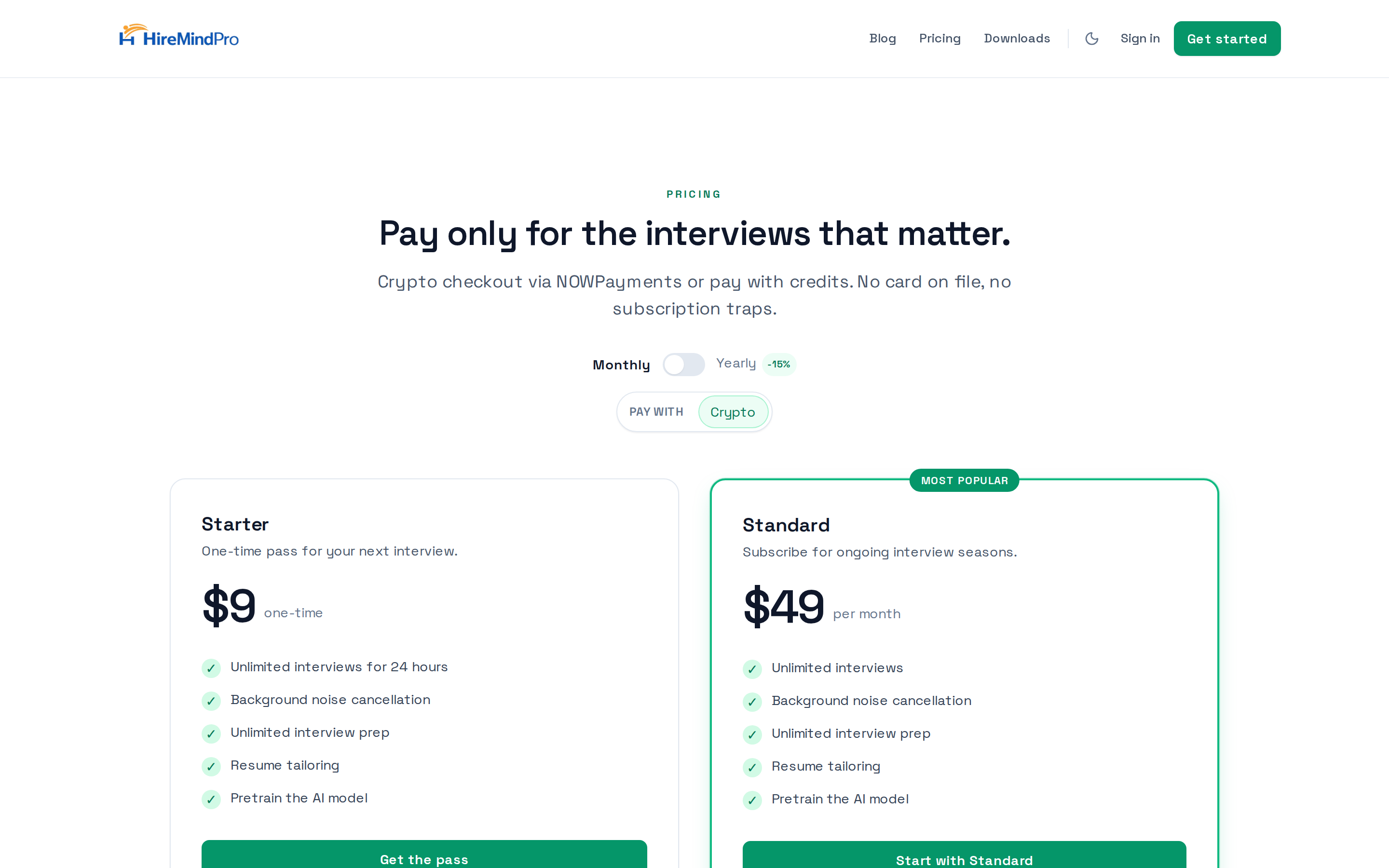
- Go to /pricing to see the plans: Starter ($9 one-time, 24-hour pass) and Standard ($49/month or $499/year — toggle Monthly/Yearly at the top; yearly shows a discount).
- Choose how to pay using the 'Pay with' selector: 'Crypto' (NOWPayments) or, if you're signed in, 'Credits' (which shows your current balance).
- Click the plan button — 'Get the pass' for Starter or 'Start with Standard' for Standard.
- If paying with crypto, you'll be sent to NOWPayments to complete checkout (no card required).
- If paying with credits, the plan price in dollars is deducted as credits from your balance (e.g. Standard monthly = 49 credits) and your membership activates immediately. If you don't have enough credits you'll be told how many you need.
- Your current plan and 'active until' date appear at the bottom of the pricing page once you're signed in.
Manage an existing subscription (card/Stripe)
- If you have a card-based Stripe subscription, the Billing settings show your current membership, card on file, and subscription status.
- Use 'Unsubscribe' to stop future charges — your membership stays active until the end of the current billing cycle, then won't renew.
- If you've scheduled a cancellation, use 'Resume Subscription' to keep it active.
- If you have no active subscription, you can start one with 'Subscribe Monthly' or 'Subscribe Yearly', which sends you to Stripe checkout.
Review your transactions and credit history
- On the Credits tab (/myaccount?tab=credits), scroll to 'Recent activity' to see your credit ledger: each row shows when it happened, the activity (e.g. Welcome bonus, Top-up (card), Top-up (crypto), Auto-apply, Voice clone, Refund), the change (green + for added, red - for spent), and your running balance.
- For membership/payment receipts, open the Billing page at /billing to see your current plan and a Billing History table with Date, Amount (USD), Interval, and Status.
- The /pricing page also shows your current plan and a billing history table when you're signed in.

Tips & good to know
- 1 credit = $1 USD and credits never expire, so there's no rush to spend them.
- You start with 5 free welcome credits — enough to try auto-apply many times (0.1 credits each) or get a head start before a voice clone.
- Only auto-apply and voice cloning spend credits. Resume tailoring, cover letters, mock interviews, interview support, and P2P sessions are covered by your paid plan, not credits.
- Top-up packages include bonus credits ($50 → 55, $250 → 300); custom amounts ($1–$1000) are a flat 1:1 with no bonus.
- Card top-ups confirm almost instantly; crypto can take a little longer. The balance auto-refreshes after you return from checkout.
- If a top-up checkout fails to return a payment link, you'll see an error in the window — try the other payment provider.
- You can pay for a subscription plan with credits on the /pricing page, but you need enough balance to cover the full plan price.
Ready to try it yourself?
View plans →